Tuesday, November 24, 2009
Launching Windows 7, Exchange Server 2010 & Windows Server 2008 R2 Overview and Demo
Friday, October 16, 2009
Algoritma & Pemrograman: Pertemuan03
- download disini
Algoritma & Pemrograman: Pertemuan02
- download disini
Tuesday, October 06, 2009
pemrograman terstruktur: pertemuan02
- Ide Pemrograman Terstruktur. download disini
Monday, September 28, 2009
pemrograman terstruktur: pertemuan01
pertemuan01. Pembahasan:
- Kontrak Kuliah Pemrograman Terstruktur. download here
- Pengenalan Pemrograman Terstruktur. download here
Dalam perkuliahan memakai bahasa pemrograman C.
untuk software compiler bahasa C bisa memakai berikut:
- http://www.q-software-solutions.de/pub/lccwin32.exe
- atau yang sudah di extrak di sini
Sunday, August 30, 2009
outlook express: Address Book failed to load. Outlook Express is incorrectly configured, please re-install.
issue happen due to windows address book (WAB) at that PC pointing to WAB file at Administrator profile. Please do below step to solve that problem.
- go to administrator profile then find file at folder:
- C:\Documents and Settings\adminisrator\Application Data\Microsoft\Address Book\permata.wab
- please set the file security to all profile can have full access status.
the issue not happen if we are using CD OEM to install windows original at new or old PC. Please try. hope can help you.
Tuesday, August 18, 2009
what is diffrence between, speed, velocity and acceleration
http://www.edinformatics.com/math_science/acceleration.htm
Definitions:
Speed or Velocity?
Speed is the rate of motion, or the rate of change of position. It is expressed as distance moved (d) per unit of time(t). Speed is a scalar quantity with dimensions distance/time. Speed is measured in the same physical units of measurement as velocity, but does not contain an element of direction. Speed is thus the magnitude component of velocity. Velocity contains both the magnitude and direction components.
Common speeds of moving objects
For human beings, an average walking speed is about 3 mph (~5 km/h, 1.39m/s),
The speed of long distance jogging for average persons is about 6 mph (~10 km/h, 2.7 m/s).
Top athletic sprinters can run at 23.03 mph (~36.85 km/h, 10.24 m/s) within a short distance such as a 200 meters dash.
Cycling can average 12 mph (~20 km/h, 5.56 m/s)
Car can average 65 mph (~104 km/h, 28.9 m/s ) on highway
A 747 Airplane has an average speed 565 mi/hr
Acceleration
Acceleration, (symbol: a) is defined as the rate of change of velocity. It is thus a vector quantity with dimension length/time². In SI units, acceleration is measured in meters/second².
To accelerate an object is to change its velocity, which is accomplished by altering either its speed or direction (like in case of uniform circular motion) in relation to time. Acceleration can have positive and negative values. Any time that the sign (+ or -) of the acceleration is the same as the sign of the velocity, the object will speed up. If the signs are opposite, the object will slow down. Acceleration is a vector quantity. When either velocity or direction changes, there is acceleration (or deceleration).
To accelerate an object requires the application of a force.
Graphing Velocity and Acceleration
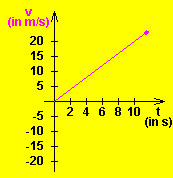
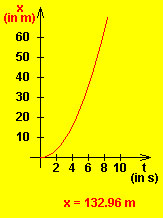
A car accelerates from rest. The following two graphs are created using a java applet (see below).
Please enter your answer in the space provided:
|
Sunday, July 26, 2009
C3 BARCODE LABEL - JEITA FORMAT 4f programming
below steps that you can use to develop printing Barcode label use format C3 JEITA 4f ?
you can use : PHP 5 programming , APACHE web server and fpdf class.
The point programming as below:
- require code39.php and $pdf->Code39($pdf->GetX()+1, $pdf->GetY(), "1P$pn1") for barcode font
- $pdf = new FPDF('P', 'cm', 'A4') for paper size
- for($i=1;$i<=$ctk1;$i++) {....} for looping label printing quantity
- function SetCol($col) { $x=25+$col*87 ...} at code39.php to set margin each column label.
- onKeyDown="if(event.keyCode==13) document.getElementById('ctk11').focus();" for setup enter and focus cursor
- onKeypress="if(event.keyCode <> 57) event.returnValue = false;" for setup only type number
- onclick="form.action='test1.php';form.submit();" for submit button
- Highlight form element- © Dynamic Drive (www.dynamicdrive.com) to create highlight form element
PAYTAX: Penurunan Rumus GROSS-UP PPH21 th2009
sehingga di peroleh rumus Gross up 2009 sbb:
(1)
(2)
Sunday, July 12, 2009
PAYTAX: methoda perhitungan pajak di indonesia
Dalam perhitungan pajak penghasilan di Indonesia (PPh21), ada 3 metoda yg bisa digunakan, yaitu :
1) Net Method
Merupakan metode pemotongan pajak dimana perusahaan menanggung pajak karyawannya
2) Gross Method
Merupakan metode pemotongan pajak dimana karyawan menanggung sendiri jumlah pajak penghasilannya
3) Gross-Up Method
Merupakan metode pemotongan pajak dimana perusahaan memberikan tunjangan pajak yang jumlahnya sama besar dengan jumlah pajak yang akan dipotong dari karyawan.
Gross-Up Method
Di formulasikan untuk menyamakan jumlah pajak yang akan dibayar dengan tunjangan pajak yang di berikan perusahaan terhadap karyawannya.
Illustrasi Perhitungan
Penghasilan = XXXX
Tunjangan Pajak = 1000
Total Penghasilan Brutto = XXXX + 1000
Pengurang:
Biaya Jabatan
Iuran Pensiun
Total Pengurang = (XXXX)
Total Penghasilan Netto = (XXXX)
Penghasilan Tidak kena Pajak (PTKP) = (XXXX)
Penghasilan Kena Pajak (PKP) = XXXX
Setelah dikenakan tarif progresif pajak (5%,10% dst), diperoleh
PPH pasal 21 terutang = 1000
Methoda Gross-Up, akan menghasilkan tunjangan pajak sama dengan jumlah pajak penghasilan terhutang.
http://harrypoe.wordpress.com/2008/01/01/gross-up-tax-indonesia-income-tax-pph21/
PAYTAX: ppH21 lapisan tarif pasal 17 mulai 1 january 2009
Rp. 0 s.d. Rp 50 juta, tarifnya 5%
Rp. 50 juta s.d. Rp 250 juta, tarifnya 15%
Rp. 250 juta s.d. Rp 500 juta, tarifnya 25%
Rp. 500 juta ke atas, tarifnya 30%
Yang perlu diingat, tarif di atas adalah tarif progresif. Maksudnya tiap lapisan Penghasilan Kena Pajak dikenakan sesuai tarifnya, bukan diakumulasi dulu, baru dikenakan tarif. Lalu sebelum dikenakan tarif, Penghasilan Kena Pajak dibulatkan dulu sampai ribuan ke bawah.
contoh:
Penghasilan Kena Pajak WP orang pribadi = Rp 671.688.950
Penghasilan Kena Pajak dibulatkan : Rp 671.688.000
PPhnya adalah :
5% x Rp 50.000.000 = Rp 2.500.000
15% x Rp 200.000.000 = Rp 30.000.000
25% x Rp 250.000.000 = Rp 62.500.000
30% x Rp 171.688.000 = Rp 51.506.400
Total = Rp 146.506.400 setahun atau Rp 12.208.867 sebulan.
atau cara lain pakai rumus excel:
=IF(A20>500000000,30%*(A20-500000000)+95000000,IF(A20>250000000,25%*(A20-250000000)+32500000,IF(A20>50000000,15%*(A20-50000000)+2500000,A20*5%)))
atau rumus ini:
untuk penghasilan Rp.1 s/d Rp. 47.500.000
PKP X 5/95
untuk penghasilan Rp. 47.500.000 s/d Rp. 217.500.000
(PKP-47.500.000) X 15/85 + 2.500.000
untuk penghasilan Rp. 217.500.000 s/d Rp. 405.000.000
(PKP - 217.500.000) x 25/75 + 32.500.000
untuk penghasilan diatas Rp. 405.000.000
(PKP - 405.000.000) x 30/70 + 95.000.000
====================
atau rumus ini:
Rumus Gross Up untuk Perhitungan Tunjangan PPh 21 yang berlaku mulai tahun 2009 adalah sebagai beikut :
Untuk Penghasilan Kena Pajak (PKP) sampai dengan Rp. 50.000.000,00 (lima puluh juta rupiah)
PKP x 5%
--------
0.95
Untuk Penghasilan Kena Pajak (PKP) lebih dari Rp. 50.000.000,00 (lima puluh juta rupiah) sampai dengan Rp.250.000.000,00 (dua ratus lima puluh juta rupiah)
(PKP x 15%)–5.000.000
------------------------
0.85
Untuk Penghasilan Kena Pajak (PKP) lebih dari Rp. 250.000.000,00 (dua ratus lima puluh juta rupiah) sampai dengan Rp. 500.000.000,00 (lima ratus juta rupiah)
(PKP x 25 %)–30.000.000
--------------------------
0.75
Untuk Penghasilan Kena Pajak (PKP) lebih dari Rp. 500.000.000,00 (lima ratus juta rupiah)
(PKP x 30 %) – 55.000.000
---------------------------
0.70
Rumus ini hanya berlaku untuk pekerja yang memiliki NPWP.
Thursday, June 18, 2009
PHP: create pivot table use ADODB
//includekan class addob
include('adodb/adodb.inc.php');
include "adodb/pivottable.inc.php";
$db = ADONewConnection("mysql");
$db->Connect('localhost','id','password','dbname') or die("COULD NOT SELECT DATABASE.<br>");
$sql = PivotTableSQL(
$db,
# adodb connection'berita b, kategori k',
# tables 'pc_berita as PC_Name',
# rows (multiple fields allowed) 'nama_berita',
# column to pivot on 'b.nama_berita = k.nama_kategori and tgl_berita >= "2009-06-01"'
# joins/where );
$db->SetFetchMode(ADODB_FETCH_ASSOC);
//tampilin datanya (buat tabel)
$rs = $db->Execute($sql);
if ($rs) {
echo "<table border ='1'>";
echo "<tr>";
$head = $rs->fields;
foreach($head as $hcol=>$col)
echo "<th>".ucfirst($hcol)."</th>";
echo "</tr>";
while (!$rs->EOF) {
$row = $rs->fields;
echo "<tr>";
$x =0;
foreach($row as $head=>$col)
{
echo "<td>$col</td>";
$x++;
}
echo "</tr>";
$rs->MoveNext();
}
echo "</table>";
}
//tampilkan generate sql nya
//echo $sql;
?>
http://phplens.com/adodb/pivot.tables.html
Wednesday, June 10, 2009
PCMAV 2.0c and conflicker virus
go to windows\system32 then rename files: RTPSvc.exe and RTPScan.dll. the please re-run again. Download location for PCMAV is http://pcmav.biz/
if you got virus conflicker, please use PCMAVExpress.exe.
before perform that, please unpluq the PC from LAN then path / upgrade to SP3 for Windows XP.
Sunday, June 07, 2009
Create value 0 for data if no value or NULL
from kategori left join berita on
kategori.nama_kategori = berita.nama_berita
and berita.tgl_berita >= '2009-06-01'
group by kategori.nama_kategori
| ACT | 1 |
| 0 | |
| Hardware | 0 |
| Internet | 0 |
| Network | 0 |
| Others | 0 |
| Software | 0 |
| VMI | 1 |

Saturday, May 09, 2009
mysql_num_rows(): supplied argument is not a valid MySQL result resource in
$tampil="select * from table ";
$hasil=mysql_query($tampil) or die (mysql_error());
$jumlah=mysql_num_rows($hasil);
import data to MySQL 5.0.45
- save the excel data to csv format and no need additional character between each column.
- open the csv file use notepad to make sure that each column separate by , (koma).
- at the AppServ, open the phpMyAdmin and select the database
- then open the table at the menu and select structure mode
- then select import menu then browse the csv file
- then select format file csv then select
- fields terminated by : , (koma)
- fields enclosed by : , (koma)
Saturday, April 18, 2009
PB connection to Ms SQL 2005
[Absensi]
DBMS=MSS Microsoft SQL Server
Database=dbname
UserId=sa
DatabasePassword =xxxxxxxx
LogId=
LogPassword=
ServerName=192.168.100.5,1433
//DbParm=CommitOnDisconnect='No'
or
[Absensi]
DBMS=MSS Microsoft SQL Server
Database=dbname
UserId= sa
DatabasePassword = xxxxxxxxxx
LogId=
LogPassword=
ServerName= XYZ
//DbParm=CommitOnDisconnect='No'
or
[Absensi]
DBMS=MSS Microsoft SQL Server
Database=dbname
UserId=sa
DatabasePassword =xxxxxxxxxxxxx
LogId=
LogPassword=
ServerName=XYZSQL\XYZ_SQL
//DbParm=CommitOnDisconnect='No'
or
you can use ODBC-DNS connection,
please add sql server driver.
same above setting if you set dbrofile at PB software
Sunday, April 12, 2009
DB profile of Powerbuilder to database
Ms SQl2005:
// Profile absensi
SQLCA.DBMS = "MSS Microsoft SQL Server"
SQLCA.Database = "absensi"
SQLCA.LogPass = <***>
SQLCA.ServerName = "server"
SQLCA.LogId = "sa"
SQLCA.AutoCommit = False
SQLCA.DBParm = ""
Sybase ASA 7
// Profile tms7 use ODBC
SQLCA.DBMS = "ODBC"
SQLCA.AutoCommit = False
SQLCA.DBParm = "ConnectString='DSN=tms;UID=user;PWD=password'"
MySQL
// Profile detik use ODBC and need install MySQL for ODBC
SQLCA.DBMS = "ODBC"
SQLCA.AutoCommit = False
SQLCA.DBParm = "ConnectString='DSN=detik;UID=root;PWD=password'"
Oracle
//from clients PC to server
profile name: SID name
server: @global.database.name
login ID: scott
password: *****
migrasi database oracle9i, Win Server 2K3 to Win XP
- stop services oracle 9i then
- copy folder database at oradata\hris
- copy file init.ora at folder pfile
- create same Global Database name and SID
- stop service oracle 9i
- copy folder database to oradata\hris
- copy file init.ora to folder pfile


Loading...